
SimpleX Chat
SimpleX ChatCommunication
4.0153.00 Reviews
- Version
- 7.0.1
- Installs
- 1.00M
- Age Rating
- Everyone
Screenshots
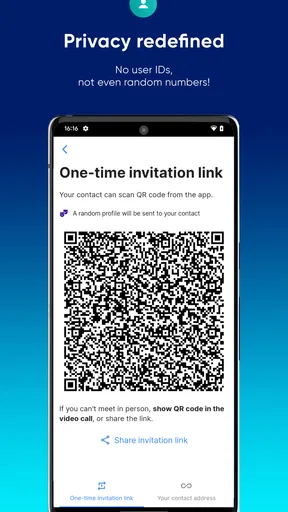
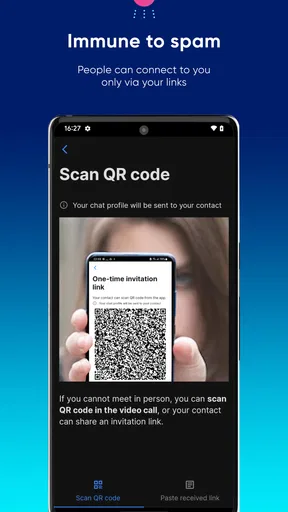
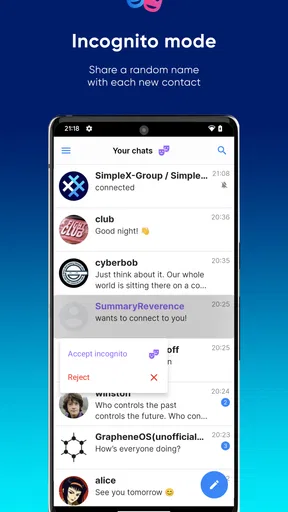
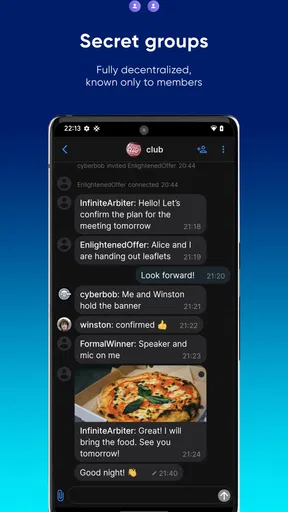
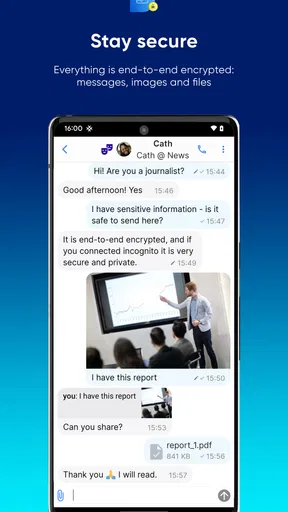

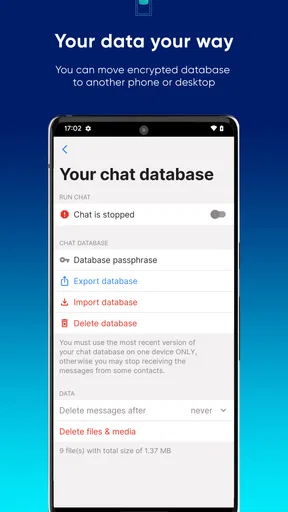
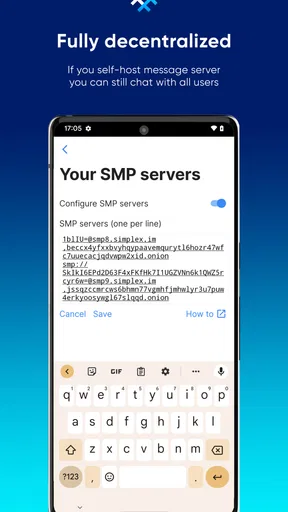
Our Review of SimpleX Chat
 Analysis by Appyee
I approached SimpleX Chat as a communication app for people who want private conversations without treating a phone number or another familiar account identifier as the center of their messaging life. That choice affects almost every part of the experience. It is not simply a familiar messenger with a privacy switch; it asks you to think more carefully about how you connect, how you find people, and what happens when your network connection is unreliable.
In everyday use, I found the appeal easy to understand. A private chat can feel more comfortable when the service is designed around end-to-end encryption and avoids user identifiers. At the same time, that privacy-first approach creates a little more friction than the usual messaging apps. If your friends already live inside one mainstream platform, convincing them to install another app and learn a different contact flow may take effort.
SimpleX Chat is a free communication app from SimpleX Chat, available for Everyone and compatible with Android starting from version 8.0. It has reached over one million installs, holds a 4.0 average from around 2.7 thousand ratings, and the current version is 7.0.1. Those figures suggest a real and growing audience, but they also set the right expectation: this is a focused privacy tool, not necessarily the default choice for every group conversation.
How the connection shapes the whole experience
Before deciding whether this approach fits me, I look at the whole path: how a conversation begins, what each person must do to keep it going, and how it holds up when circumstances change. The key trade-off is not privacy versus no privacy, but how much extra intention I’m willing to bring to everyday messaging. That becomes clearest when I follow the connection from invitation through an ordinary exchange.
Private messaging is only useful when the network cooperates
The first practical lesson is straightforward: SimpleX Chat depends on connectivity for the moments when you need to send or receive messages. That sounds obvious, but it changes how I judge the app. A privacy-focused design cannot make a weak signal disappear. When I am moving between buildings, using crowded public Wi-Fi, or passing through an area with inconsistent mobile coverage, the important question is not whether the interface looks polished; it is whether a message can move reliably through the available connection.
This makes the app feel most natural when I treat it as a deliberate conversation tool rather than an always-available social feed. I open it to speak with someone, check a private exchange, or continue a discussion that matters. I do not expect it to replace every communication channel in my life, especially when a group needs instant coordination and everyone is already using a more established service.
There is also a useful distinction between privacy and availability. End-to-end encryption can protect the content of a conversation, but it does not guarantee that a message will arrive while the phone is offline or the network is unstable. I would therefore avoid planning a time-critical meeting around this app alone. For a casual conversation, a delayed exchange is usually acceptable. For a last-minute change of venue, I would want a backup method already agreed with the other person.
Starting a conversation takes more intention
Many familiar messengers make discovery effortless because contacts are connected to phone numbers, email addresses, or a broad account system. SimpleX Chat’s approach is more privacy-conscious, so the starting point feels less automatic. That is a strength if you do not want a service to build your messaging identity around a conventional identifier. It is a hurdle if you expect the app to scan your address book and immediately show every friend who is available.
I see this as a trade-off rather than a flaw. The extra step encourages both people to make a conscious connection, which can be reassuring for private conversations. The downside is that adoption becomes social work. You may need to explain why you are suggesting this particular messenger, help someone install it, and make sure the invitation or connection process is completed while both sides have a usable network.
That matters for families and small teams. If everyone is willing to use the same privacy-first tool, the deliberate setup becomes manageable. If only one person cares about changing platforms, the conversation may never get far enough to justify the effort. In that situation, a conventional messenger with a larger existing contact network may be more practical, even if it offers a less distinctive privacy model.
A realistic mobile scenario
Imagine that I am commuting and need to coordinate with a friend about collecting a parcel. I send a message while connected to a station’s Wi-Fi, then move underground before the conversation is complete. The app’s value in that moment is not just the encryption; it is the clarity of knowing that the message belongs to a private channel rather than a public social space. But the weak connection still governs the timing. If the message does not move immediately, I need patience or another way to confirm the arrangement.
In a more relaxed situation, such as discussing travel plans over several hours, the same limitation matters much less. I can write a thoughtful message, wait for the network to settle, and continue later. This is where the app feels strongest: private, asynchronous conversations in which security and control matter more than instant group-wide visibility.
What happens when a message appears stuck?
When communication fails, I prefer a calm recovery routine instead of repeatedly tapping send. First, I check whether the phone has a working connection by opening another service. If that fails, the problem is probably the network rather than the conversation. I then move between Wi-Fi and mobile data if both are available, return to the chat, and give the app a moment to catch up.
If the other person has not received a message, I avoid assuming that privacy features are responsible. Network transitions, background restrictions, or a temporarily poor signal can all interrupt normal messaging. The practical habit is to keep important details in the same conversation and resend only when I know the first attempt did not go through. Sending several copies during a connection change can create confusion once the service catches up.
For urgent communication, I use a simple rule: if the message affects someone’s immediate safety, location, or deadline, I confirm it through a second channel. That is not a criticism of SimpleX Chat; it is sensible behavior with any internet messenger. The app is best when both people understand that privacy does not remove the need for a reliable path between devices.
Recovery is also a people problem
A technical interruption is only half the issue. The other person may not know whether I am offline, whether the message is delayed, or whether I have chosen not to answer. With ordinary messaging platforms, people often rely on familiar delivery cues and habits. In a privacy-oriented app, I recommend agreeing on expectations before using it for important conversations: how long to wait, when to try again, and which alternative channel is acceptable for urgent matters.
This small agreement makes the experience much smoother. It prevents a private messenger from becoming a source of unnecessary stress. It also helps new users understand that the app is not designed to remove every uncertainty from communication. Its purpose is to provide a different balance between privacy, identity, and convenience.
Using it carefully on mobile data
SimpleX Chat is free to download, which lowers the barrier to trying it. However, free access does not mean that messaging has no practical cost. The phone still needs a network connection, and mobile data may matter if I am away from Wi-Fi. Text conversations are generally easier to fit into a limited data plan than media-heavy communication, but I still pay attention when a chat includes large attachments or extended exchanges.
My data-conscious routine is simple. I avoid starting a long private conversation while the phone is switching networks, especially if I am travelling. I also prefer a stable Wi-Fi connection for setup, updates, and any exchange that may involve more than plain text. On a limited plan, I keep an eye on the phone’s normal data controls rather than assuming that a privacy-focused app automatically uses very little data.
There is another side to this: privacy tools can encourage more careful communication. Instead of scattering sensitive details across several platforms, I can keep a discussion in one intentionally chosen channel. That reduces the temptation to copy private information into a public group or a casual social app. The benefit is organizational as much as technical.
Privacy without pretending convenience does not matter
The strongest reason to choose this app is its unusual identity model. SimpleX Chat is built around private, end-to-end encrypted messaging without user identifiers, and that makes it meaningfully different from services that expect a phone number or public username to be the foundation of contact. For people who are cautious about linking conversations to an established identity, this is not a cosmetic feature.
Still, privacy can introduce friction. Friends may ask how to reach you, groups may not want another app, and moving between devices or conversations may require more attention than users are used to giving. I would not recommend installing it merely because the word “private” sounds attractive. I would recommend it when you have a clear reason to reduce identifier-based exposure and the people you need to contact are willing to follow the same approach.
This is also why I would not treat it as a universal replacement for every alternative. A mainstream messenger is usually better for broad family adoption, large informal groups, and instant coordination with people who already use it. A work platform may be better when shared files, calendars, or organization-wide administration are the priority. SimpleX Chat makes more sense when the conversation itself deserves a privacy-first home and the participants accept the setup involved.
Who will appreciate it most?
I think the app suits people who regularly discuss personal matters, independent projects, travel plans, or sensitive topics and do not want their messaging identity tied to a conventional identifier. It can also appeal to privacy-minded friends who are comfortable explaining a different connection process to one another. The free price makes experimentation easy, while the Everyone age rating keeps it broadly accessible.
It is less suitable for someone who wants effortless contact discovery, a single platform that every acquaintance already uses, or a messenger chosen mainly for high-volume group activity. It may also frustrate users who expect every message to behave like an instant text regardless of signal quality. If your priorities are maximum convenience and universal reach, another communication app will probably feel easier.
What the paid options mean in practice
The app is free, but in-app purchases are listed from $6.99 to $420.00 per item. I would not interpret that range as a reason to pay before understanding the free experience. The sensible approach is to install it, test a private conversation with someone you trust, and decide whether any optional purchase is relevant to your own use. The core decision is whether the app’s privacy model fits your contacts and habits, not whether an upgrade exists.
I also appreciate that the app’s value can be judged through a real workflow rather than a brief glance at its store page. I would test it at home on Wi-Fi, during a normal mobile-data commute, and after a deliberate network change. I would also ask a friend to join, because the contact experience is central to whether SimpleX Chat works for me. An app can be technically appealing and still fail socially if nobody I need to reach will use it.
Small habits that improve the experience
My first tip is to establish the conversation before an urgent need arises. Installing the app while someone is waiting for an immediate answer creates avoidable pressure. A relaxed setup gives both people time to understand the connection process and confirm that messages arrive as expected.
My second tip is to separate privacy requirements from urgency. Use SimpleX Chat for conversations where confidentiality and control matter, but keep a mutually understood fallback for emergencies or time-sensitive coordination. This avoids blaming the app when the real issue is that no internet messenger can guarantee communication through a dead zone.
My third tip is to judge the app over a complete conversation, not a single sent message. Start a chat, let the network change naturally, return later, and notice how comfortable you feel managing the exchange. That test reveals more than simply opening the interface, because the main trade-off is the relationship between privacy, connectivity, and convenience.
My fourth tip is to explain the reason for the invitation in plain language. Saying “this lets us chat privately without using the usual identifier” is more useful than presenting it as a mysterious alternative. People are more likely to complete the setup when they understand what problem the app solves for them.
My connectivity verdict
SimpleX Chat works best when I use it intentionally: a private communication space for people who value an identifier-free approach and are willing to accept a little more setup. Its end-to-end encrypted design gives the app a clear purpose, while its dependence on a working connection keeps the experience grounded in ordinary mobile realities. A weak signal can delay any messenger, and this one is not exempt from that basic limitation.
After weighing the smooth moments against the friction, I would recommend it to privacy-conscious users who can bring their important contacts with them. I would not make it my only channel for urgent arrangements, nor would I push it on a group that refuses to leave a familiar platform. For the right conversation, though, it offers a thoughtful alternative to identifier-driven messaging.
My final recommendation is to try it with one trusted contact under both Wi-Fi and mobile conditions. If the privacy model feels worth the deliberate connection process, the app can become a dependable part of your communication routine. If universal reach and instant convenience matter more, the usual alternatives will probably serve you better.
Verdict
Strengths of SimpleX Chat
- No phone number, email, or username is required to create an account.
- End-to-end encryption protects messages, calls, and shared files.
- Disappearing messages and privacy-focused settings offer extra control.
- Supports multiple devices and separate chat profiles for different uses.
- Open-source code and independent servers improve transparency and flexibility.
Limitations of SimpleX Chat
- The interface can feel unfamiliar compared with mainstream messaging apps.
- Finding contacts requires an invitation link, QR code, or connection address.
- Some features depend on the availability and reliability of chosen servers.
- Smaller user base makes it harder to find friends already using the app.
- Advanced privacy options may take time for new users to understand.
Similar Picks in This Category
View All
Google Messages
Google LLC4.6

Gmail
Google LLC4.1

Google Meet
Google LLC4.4

Google Chrome
Google LLC4.1

WhatsApp Messenger
WhatsApp LLC4.6

Carrier Services
Google LLC4.2
Frequently Asked Questions
What is SimpleX Chat, and how is it different from other messaging apps?
SimpleX Chat is a privacy-focused messaging app designed to communicate without assigning users permanent identifiers such as usernames, phone numbers, or email addresses. Instead, contacts connect through one-time invitation links or QR codes. This design helps reduce unwanted discovery and metadata exposure, although it may require more deliberate contact management than conventional apps.
Does SimpleX Chat require a phone number, email address, or account registration?
No. SimpleX Chat does not require a phone number, email address, or traditional account registration to start using the service. You create a local profile on your device and share an invitation with people you trust. Because there is no central username to search for, adding contacts usually involves sending or scanning an invitation link or QR code.
How private and secure is SimpleX Chat?
SimpleX Chat uses end-to-end encryption for conversations and is built to minimize identifying information and connection metadata. Messages are routed through SimpleX infrastructure or compatible servers without relying on a permanent user ID. However, privacy also depends on your device security, backups, notification settings, and the trustworthiness of the person you are communicating with.
Can I use SimpleX Chat for group conversations, voice calls, and file sharing?
Yes. SimpleX Chat supports private conversations and group chats, and it also provides features such as voice messaging, voice and video calls, and file or media sharing, depending on the current app version and platform. Performance can vary with internet quality and server configuration, so it may not feel identical to mainstream messaging services.
What should I know before moving SimpleX Chat to a new phone?
You should prepare for device migration before uninstalling the app or resetting your phone. SimpleX Chat stores important account and conversation information locally, and recovery may depend on the backups or transfer options you configure. Review the app’s current backup and migration tools, protect any backup with a strong password, and test your recovery method whenever possible.
